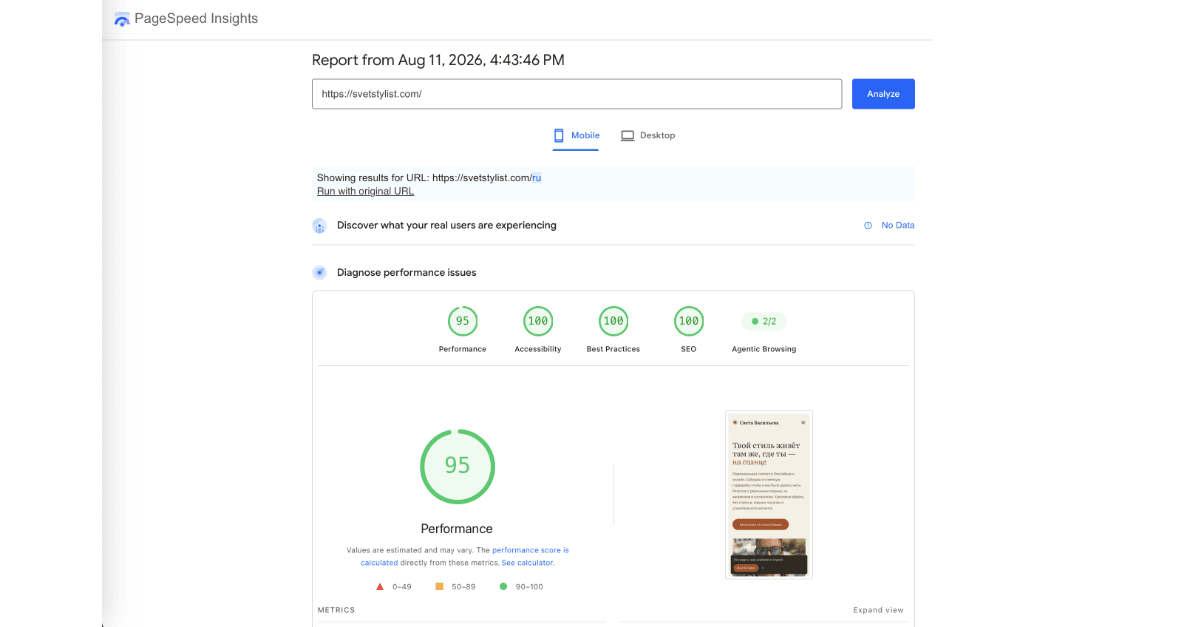
For twenty years, if a client needed a site they could edit themselves — without calling a developer for every price change or new photo — the answer was WordPress, whatever its problems. Plugin bloat, constant security patching, a hosting bill that creeps up, and a database of “temporary” fixes nobody remembers the reason for. There hasn’t been a real alternative, not one that actually gives a non-technical client full control over their own content.
I think that’s changing. I just built a client site on a completely different stack — a schema-driven CMS called EmDash, running entirely on Cloudflare’s infrastructure — and it’s the first time I’d genuinely tell a client “this replaces WordPress” rather than “this is a nicer page builder.”
The pitch is really about the combination. Cloudflare, on its own, now quietly does what used to take four or five separate vendors: it’s your domain registrar, your SSL certificate, your database, your file storage, your bot/DDoS protection, and — with two plugins I’ve built on top of it — your business email and your CRM. All under one account, all billed together, all for a few dollars a month. Here’s what that actually looked like to build, for a personal stylist’s bilingual marketing site in Lisbon.
The Stack, in Plain Terms
- Domain + SSL — Cloudflare, same place as everything else. No separate registrar, no certificate to renew by hand.
- The CMS — EmDash, a schema-driven headless CMS that runs as part of the Astro app itself, not a separate service you have to keep patched.
- The database and file storage — Cloudflare D1 (SQLite) for content, R2 for uploaded photos. Both live in the same account as the domain.
- Bot and DDoS protection — on by default, part of the same Cloudflare account, nothing extra to configure or subscribe to.
- Business email, in and out — real transactional email sent from the client’s own domain, plus unlimited inbound aliases on that domain, routed however makes sense: some forwarded straight to the client’s existing inbox, some sent to a Worker for custom handling.
- A CRM that catches every lead — a second plugin that turns every site form submission into a real CRM record instead of an email that gets buried.
- The hosting — Cloudflare Workers. No server to patch, no “please update WordPress core” email ever again.
Total recurring cost: $5 a month, on Cloudflare’s Workers paid plan — which covers hosting the site and 200 outbound transactional emails a day. Domain registration is separate but modest, and everything else (database, storage, bot protection) sits inside Cloudflare’s free tier at this traffic level.
How It Was Actually Built
A CMS with no server of its own
The whole backend is a few lines in the app’s own config — there’s no separate CMS install, no PHP runtime, no admin panel to secure independently:
// astro.config.mjs
export default defineConfig({
  output: "server",
  adapter: cloudflare(),
  integrations: [
    emdash({
      database: d1({ binding: "DB", session: "auto" }),
      storage: r2({ binding: "MEDIA" }),
    }),
  ],
});
That’s the backend. The admin UI ships with it — passkey login (no passwords to leak), drafts and revisions, a real media library. One deploy, nothing else to install.
Fields that mean something, not generic “blocks”
The usual headless-CMS trap is one generic “Page” collection with flexible content blocks, because it feels reusable. In practice it means the client opens an edit form full of fields that don’t apply to what they’re editing. I gave each real page type — services, case studies, testimonials, blog posts, the home page — its own schema instead, with fields in plain language:
npx emdash schema add-field pages hero_headline --type string --required
npx emdash schema add-field pages stat_clients --type string
Not content_block_1. When the client opens the editor, every field is something she’d describe in a sentence — the headline, the price, the client’s quote — with nothing to guess at.
Photos that optimize themselves
This is the one that mattered most day to day. The client uploads whatever her phone produced — a 1MB, full-resolution JPEG straight off an iPhone. A CMS that requires “please compress your images first” as a manual step is a CMS that will eventually serve a slow, unoptimized site, because nobody remembers the extra step every time.
The fix turned out to be two settings, not application code — one telling Cloudflare’s Workers to actually resize/reformat images, one telling Astro that this site’s own domain is allowed to be optimized:
// wrangler.jsonc
"images": { "binding": "IMAGES", "remote": true }
// astro.config.mjs
image: { domains: ["my-real-domain.com"] },Both are easy to miss because nothing errors when they’re absent — it just quietly serves the original, full-size file, and the failure only shows up as “why is the site slow.” With both in place, a 985KB raw phone photo becomes a 120KB properly-sized file automatically, no workflow change for the client, no image ever leaving the site unoptimized again.
Email that actually belongs to the client’s domain
Most small-business sites either skip transactional email entirely or bolt on a third-party service (its own account, its own bill, its own DNS records to maintain). Cloudflare does both directions of email natively once a domain is on it — the same routing I used to set up free professional email for my own startup — and I built a plugin around that: outbound transactional mail sent as the client’s own address —
await env.EMAIL.send({
  to: CONTACT_EMAIL_TO,
  from: { email: "[email protected]", name: "Website form" },
  subject, text, html,
});
— and inbound routing with no limit on how many addresses exist. hello@, booking@, a unique alias per ad campaign, whatever the client wants — each one either forwards straight to their real inbox, or gets routed to a Worker that processes it in code (auto-replies, parses an attachment, files a ticket). No mailbox limits, no per-alias fee, because it was never really “mailboxes” — it’s addresses on a domain, routed however the business logic needs.
Leads that don’t get lost
The contact form notifies the client by email, same as any site — but email is where leads go to die, buried under everything else in an inbox a week later. The second plugin writes every form submission straight into a real CRM alongside the notification: a contact record, timestamped, tagged by source, ready for a follow-up sequence rather than a scroll-back-through-my-inbox search. The client gets both — the immediate email ping, and a permanent, searchable record that survives even if the email gets missed.
An SEO panel that actually does something
Most CMSs ship a per-page SEO panel — title, description, canonical URL. It’s easy for that panel to exist, save correctly, and simply not be read by anything, because the actual page templates build their meta tags from somewhere else entirely. That was the case here until I traced it and wired the panel’s saved values in as a real override — CMS value if the client filled it in, a sensible computed default otherwise. Now when she edits “SEO Title” on a page, that’s genuinely what Google sees.
What This Buys the Client
Once it’s live, her side of the relationship is: log in, edit a field, hit save. No developer in the loop for a price change, a new testimonial, or a new blog post. Every form submission becomes a real lead in a real CRM, not a needle in an inbox. Every notification email comes from her own domain, not some third-party sender that looks like spam. And because it all sits on Cloudflare’s own network, the same account handling the domain and SSL is already absorbing bot traffic and DDoS attempts before they reach the app — infrastructure a WordPress site would need three or four separate paid add-ons to approximate.
Pitfalls I Hit
- Silent failures over loud errors. Both the image pipeline and (separately) the site’s bilingual routing behaved differently locally than once actually deployed — nothing crashed, it just quietly did the wrong thing. Always test the real deployed build, not just the local dev server.
- A “working” admin form isn’t the same as a working feature. The SEO panel saved data and rendered correctly for months without anything ever reading it. Trace every CMS field all the way to the template that’s supposed to use it.
- Google Fonts is a GDPR question, not just a performance one. Loading fonts from Google’s CDN sends every visitor’s IP to Google on each page view — a real compliance issue for an EU business. Self-hosting the same font files removed both the external request and the compliance question.
- Even “free” infrastructure has one metered line. Everything here is free at this traffic level except image transformations, which is free up to 5,000 resizes a month and $0.50 per 1,000 after — worth knowing before promising a client “$0/month,” even if it’s close to true in practice.
Is It Actually a WordPress Replacement?
For a marketing site where the client needs full, easy control over real content — text, prices, photos, case studies, leads, email — and doesn’t need a plugin marketplace or a theme store: yes, genuinely. What you give up is exactly what makes WordPress fragile in the first place — the enormous plugin ecosystem and the attack surface that comes with it. What you get back is a site that’s faster by default, cheaper to run, comes with its own working CRM and business email out of the box, and doesn’t need a “please update your plugins” email ever again.
If your own site is the WordPress one and you’d rather spend less time patching it than growing it, that’s exactly the kind of project I take on — see how I work with clients.
Frequently Asked Questions
Is EmDash CMS really an alternative to WordPress?
For a marketing or brochure-style site where the client edits real content — text, prices, photos — rather than needing a plugin ecosystem, yes. EmDash is schema-driven and runs inside the app itself rather than as a separate PHP server, which removes the biggest source of WordPress’s ongoing maintenance and security burden.
What does the Cloudflare stack actually include?
Domain registration, SSL, a SQL database (D1), file storage (R2), serverless hosting (Workers), image optimization, and bot/DDoS protection, all under one account and one bill — plus, with two purpose-built plugins, real transactional and inbound business email on the client’s own domain and a CRM that captures every lead from the site.
How much does a site like this cost to run?
$5 a month covers Workers hosting and 200 outbound transactional emails a day. The database, storage, and bot protection sit inside Cloudflare’s free tier at small-business traffic levels; domain registration is the one separate, modest line item.
Can the client receive email on their own domain without a full mailbox provider?
Yes — Cloudflare’s email routing allows unlimited addresses on a domain with no per-mailbox fee. Each address can forward to an existing inbox or route to a Worker for custom processing, which is also how outbound transactional email (form notifications, confirmations) gets sent from the client’s own address instead of a third-party sender.
What happens to a lead submitted through the site’s contact form?
It’s written into a real CRM as a contact record — timestamped and tagged by source — at the same time the client gets an email notification. That way a lead survives even if the notification email gets missed or buried, and it’s there for a proper follow-up sequence rather than an inbox search.
Why did image optimization need special configuration instead of just working?
Astro’s Cloudflare image service needs an explicit binding to Cloudflare’s image-transformation feature and an explicit list of which domains it’s allowed to optimize. Neither is on by default, and neither fails with an error when missing — it silently serves the original, unoptimized file instead, which only shows up as the site feeling slow.